
Zone Z-01 · themes, UI kits, dark mode
A GoHighLevel white label theme in your truck colors
Pick one of 27 complete themes and the whole app changes: sidebar, header, cards, tables, buttons and the blues GoHighLevel hard-codes everywhere. Put any of 11 UI kits on top, or switch to dark mode for the dispatcher who is in it until close.
- 27 themes, 3 dark
- 11 UI kits
- In every package
ModelCZ-THM / LX-DM
- Themes
- 27
- Dark mode
- 3themes
- UI kits
- 11
- Top-bar themes
- 5
- Color remap
- On
- Install
- 1line
Unlocked fromComfort Basic · $177 once
What is a GoHighLevel white label theme?
A white label theme is a complete look laid over the whole GoHighLevel app, not just a logo swap. It sets the sidebar or top bar, header, page background, cards, buttons, tables and modals in your colors, and remaps the blues GoHighLevel hard-codes, so your CSRs, techs and clients see your system instead of the stock CRM.
Live · real engine
Run every theme and kit on a real dashboard
Switch between light and dark mode, pick any of the 27 themes, then lay a UI kit over it. Pastel Mesh on the Brutalist kit is where we start; Midnight Mint is the dark mode to try next.
The swatch wall
All 27 themes, by name and color
Every theme in the catalog with its sidebar and primary color. Each comes with a matched UI kit and, for most, a paired login design.
Light themes 24
- Midnight EmberDark navy sidebar, orange energy
- Arctic CleanWhite top bar, crisp blue SaaS lookTop bar
- Ocean GlassFrosted glass over an ocean photo, right dock
- Forest FinanceDeep green, side accents, calm & trustworthy
- Neon NightsPurple-to-pink glow, bold and modern
- Mono StudioBlack & white brutalist, top barTop bar
- Sunset CoralWarm peach sidebar, round & friendly
- Royal Navy & GoldPremium navy with gold highlights
- Lavender DreamPastel lilac, soft & airy
- Slate CorporateNeutral slate & indigo, compact & efficient
- AuroraGlass sidebar over a northern-lights photo
- Desert SandEarthy beige & terracotta, top barTop bar
- Midnight SkyDeep violet night, twinkling stars on the login
- Editorial StudioCrisp black & teal, magazine-style login
- Cinematic CityAmber city lights, full-screen photo login
- Care DeskFriendly support blue, split photo login
- Prism ProDark indigo with a color-ring login
- Pastel MeshSoft light theme, morphing color loginTop bar
- Alpine GlassFrosted glass over misty mountains
- Creative AgencyCrisp white & rose, top bar, photo-wall loginTop bar
- Golden HourWarm peach & amber, sunrise-hills login
- Deep SpaceMidnight blue & cyan, orbiting-planets login
- Cyber LimeNear-black with electric lime, light-beam login
- Holo PearlPearl white with pink-violet foil, holographic login
Dark mode themes 3
- Graphite ProDark mode , soft graphite with an indigo glow
- Obsidian OLEDDark mode , true black with a vivid raspberry glow
- Midnight MintDark mode , deep navy with fresh mint accents
UI kits
11 ways to build the same screen
A kit changes the components, not the colors: how cards sit, how buttons press, how tables read. Any kit works on any theme.
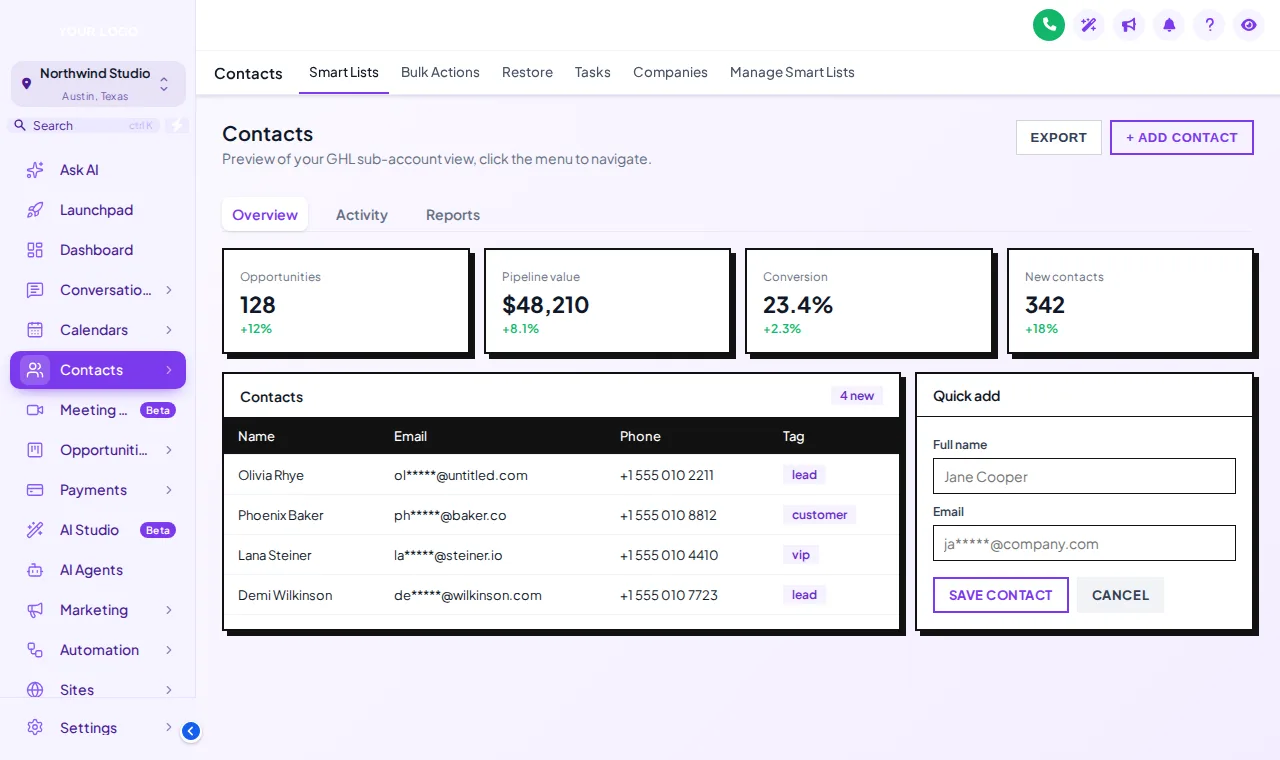
- Soft ShadowBorderless cards, gentle shadows, 14px corners. Calm for long CSR shifts.
- Bordered FlatCrisp 1px borders, no shadow, 8px corners. Reads like a spec sheet.
- ElevatedFloating cards with deep shadows, so layers are obvious.
- GlassFrosted, translucent cards, at their best over an image background.
- Accent TopWhite cards with a stripe of your brand color across the top.
- Side AccentA brand-color stripe down the left side; compact and tidy.
- BrutalistThick black borders, hard offset shadows, square corners.
- Studio GradientBrand gradient borders, soft depth and 16px corners.
- Halo GlowCards softly lit in your brand color.
- Crisp HighlightA glassy top highlight, fine borders and a focus ring on hover.
- Rounded PillVery round and friendly, with pill-shaped buttons.
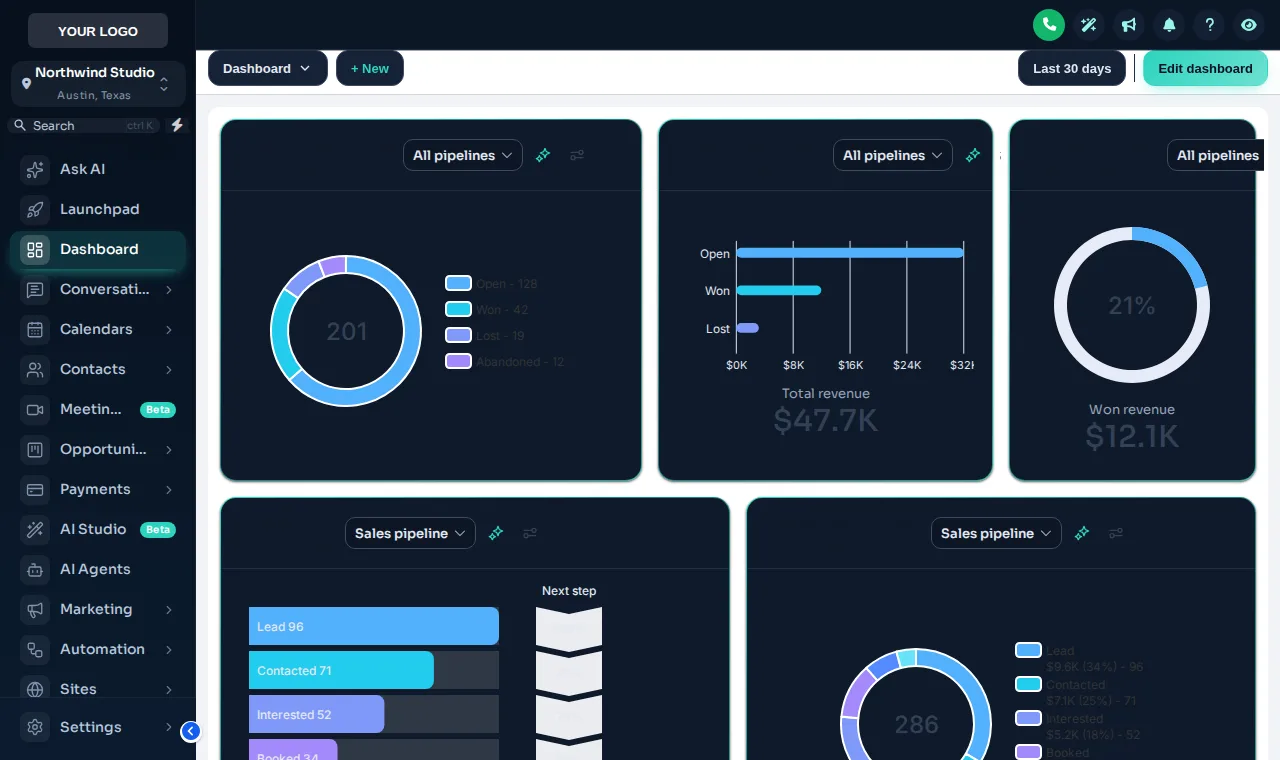
GHL dark mode
Dark mode for the person on the dispatch board till 7 pm
The 3 dark themes give every page with the GoHighLevel sidebar a proper dark palette in your brand: surfaces, borders, muted text and charts all re-colored, not just inverted.
Midnight Mint pairs deep navy with mint accents, Obsidian goes near-black, and Graphite stays a softer charcoal. Each keeps your brand color on buttons and active items, so the screen still feels like your shop.
Prefer light for the office and dark for the late shift? Save both as templates and switch in the editor whenever you like.
Before and after
What a theme changes on a service shop's screens
| Screen | Stock GoHighLevel | With a theme |
|---|---|---|
| Sidebar and header | GoHighLevel's default navy and blue | Your colors and logo, or a top bar instead of a sidebar |
| Buttons, links, tabs | Hard-coded GoHighLevel blue | Remapped to your primary color everywhere |
| Cards and tables | Plain white boxes | The UI kit you pick: soft, bordered, glass, brutalist and more |
| Long shifts | The same bright screen all day | A dark mode theme with its own palette, in your brand |
| Screen shares and training | Customer details on show | Privacy mode blurs names, emails and phones |
Pair the theme with a matching login page and a menu built around your office.
FAQ
Theme questions, plain answers
Themes, kits, colors and dark mode.
Stuck on something not listed? Ask a real person and we answer within one business day.
TH-01What is a GoHighLevel white label theme?
It is a complete look applied over the whole GoHighLevel app: sidebar, header, page background, cards, buttons, tables, forms and modals, in your colors. The customizer ships 27 of them, 3 with dark mode, and you can change any color, font or corner radius after you pick one.
TH-02Does a theme change the whole of GoHighLevel or only the sidebar?
The whole app window. A theme sets the sidebar or top bar, header, page background, cards, inputs, tables, tabs and modals, and the color remap replaces the blues GoHighLevel hard-codes across its pages.
TH-03Can I use my own brand colors instead of a preset?
Yes. A theme is a starting point. In the editor you set your primary color, logo, font, radius and shadow depth and watch the result on a live preview before you save.
TH-04How does dark mode work in GoHighLevel?
Pick one of the 3 dark themes, such as Midnight Mint, and GoHighLevel pages switch to a dark palette with their own surfaces, borders and text colors. It applies to the pages with the GoHighLevel sidebar; the login page keeps its own design.
TH-05What is a UI kit?
A UI kit restyles the building blocks: cards, buttons, inputs, tables, tabs and modals. There are 11, from Soft Shadow to Brutalist, and you can put any kit on any theme. The preview on this page starts with Lavender Dream and Pastel Mesh themes on the Brutalist kit.
TH-06What does the color remap do?
GoHighLevel hard-codes its blue in hundreds of places: links, tabs, toggles, badges. The remap swaps every one of them for your brand color, so nothing on screen gives away the stock app.
TH-07Which theme suits an HVAC company?
Start from your truck and uniform colors. Dark navy with orange (Midnight Ember) or a clean light theme with a strong primary (Arctic Clean, Pastel Mesh) read well on a dispatch screen. Use a dark theme such as Midnight Mint for the people in the app all day.
TH-08Will my team and clients see the new theme straight away?
Yes. Once the install line is in place, every save reaches every sub-account on its next page load. Nobody has to install anything on their side.
TH-09Is there anything a theme cannot restyle?
A few GoHighLevel screens, such as parts of Location Settings, load inside a frame from another domain. Browsers block outside styling there, so those areas keep the stock look.
TH-10Which package includes themes and dark mode?
Every package. Themes, all 11 UI kits, dark mode, your colors and logo and the login page designs start with Comfort Basic at $177, one-time.
Keep exploring
Connected zones
- Z-03Login page designs16 animated login designs covering sign-in, two-factor and password reset, 4 with rotating quotes.Comfort Basic · $177+
- Z-02Menu builderSidebar, right dock or top bar in 8 styles, 8 mega menu styles and a floating quick menu in 8 designs.Climate Pro · $437+
- Z-04Dashboard designs18 dashboard designs (6 with photo backgrounds) for the GoHighLevel sub-account dashboard.Climate Pro · $437+
- Z-INInstall guideStep-by-step: paste one line into Agency Settings, Company, White Label, Custom JS (plus one CSS line for the login page) and every change after that goes live without re-installing.
- WebsitePrebuilt HVAC websiteMatch the CRM look to a conversion-ready website for your shop.
Put your colors on every GoHighLevel screen
Comfort Basic includes all 27 themes, 11 UI kits, dark mode, your colors and logo, and every login page design.
- One-time payment, lifetime access
- Login emailed within minutes (max 24 hours)
- Secure card payment by Stripe