
Zone Z-06 · contact actions bar
A GHL contact actions bar: tag the no-heat call in one tap
Quick tags and action buttons that live on the GoHighLevel contact record. Tag a call, kick off the workflow you already built, and log the equipment into custom fields without leaving the conversation.
- 6 positions, draggable
- Tags and custom fields
- From Climate Pro
Dana WhitfieldFurnace · 14 yrs · Plan member
Live · nothing is saved
Tap the tags, open the form, drag the bar
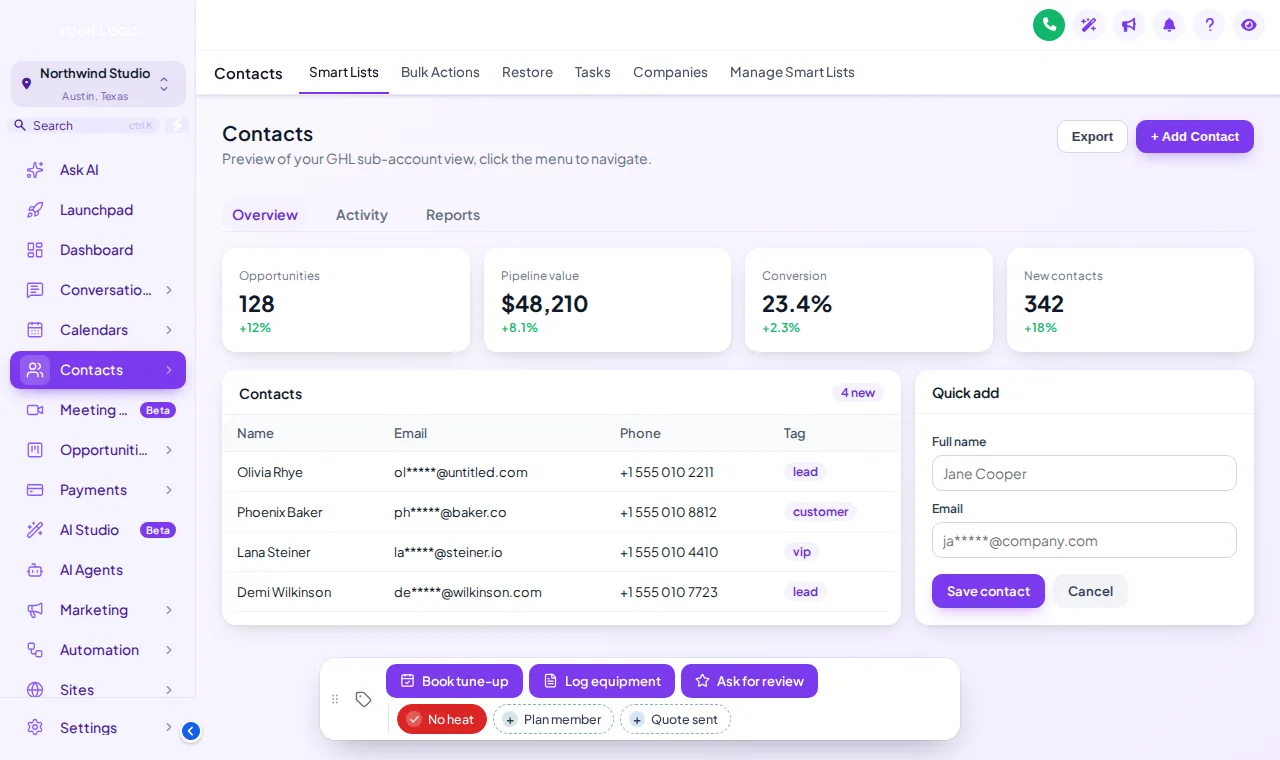
The real actions bar on a sample record, set up for an HVAC office: No heat, Plan member and Quote sent as quick tags; Book tune-up, Log equipment and Ask for review as buttons.
What does a contact actions bar do in GoHighLevel?
It puts the actions your office repeats all day on the contact record itself. Quick tags add or remove a tag in one tap, which starts any GoHighLevel workflow triggered by that tag. Action buttons add tags or open a short form that writes into custom fields. The bar can sit in 6 positions and be dragged out of the way.
One call, timed
A no-heat call, start to finish
What the bar takes out of a typical emergency call. The tags and workflows are yours; the bar makes them one tap away.
01On the call
Homeowner calls: no heat
The CSR opens the contact while still on the phone. The actions bar is already sitting at the bottom of the record.
02Tagged
Tap the “No heat” tag
One tap adds the tag. If you have a GoHighLevel workflow that starts on that tag, it starts now: the emergency text, the on-call alert, whatever you built.
03Recorded
Tap “Log equipment”
A short form opens: system age, last service, system type. Save, and the answers land in the contact’s custom fields.
04Done
Hang up, next call
No hunting through tabs for the tag field or the custom fields section. The record is complete before the next line rings.
Set it up for your office
Tags and buttons worth putting on the bar
Suggestions for an HVAC front office. Each one only does something if you have the matching tag or workflow in GoHighLevel.
| On the bar | Type | What it is for |
|---|---|---|
| No heat / No cool | Quick tag | Starts your emergency workflow: on-call alert, ETA text to the homeowner. |
| Plan member | Quick tag | Marks maintenance-plan customers so priority and pricing rules apply. |
| Quote sent | Quick tag | Starts the quote follow-up sequence the moment the CSR confirms it went out. |
| Book tune-up | Button (adds a tag) | Hands off to your booking workflow for seasonal tune-ups. |
| Log equipment | Button (form) | System age, last service and system type into custom fields for the tech. |
| Ask for review | Button (adds or removes a tag) | Queues the review request after a completed job. |
FAQ
Actions bar questions from the front office
Tags, buttons, workflows and placement.
Stuck on something not listed? Ask a real person and we answer within one business day.
CA-01What is the GHL contact actions bar?
A bar that sits on the GoHighLevel contact record with quick tags and action buttons. One tap adds or removes a tag, or opens a short form that writes straight into the contact’s custom fields, so the front office does not dig through tabs mid-call.
CA-02What can an action button do?
A button can add tags, remove tags, or open a form whose fields map to the contact’s custom fields, such as system age, last service date or system type. It shows a confirmation message when it is done.
CA-03How does a quick tag start a workflow?
The bar adds the tag; GoHighLevel does the rest. If you have a workflow with a "contact tag added" trigger for that tag, it fires exactly as if the tag had been added by hand. The bar does not create workflows for you.
CA-04Where does the bar sit on the screen?
In any of 6 positions (bottom center, bottom left, bottom right, top center, top left, top right), and people can drag it by its grip if it is in the way.
CA-05Can quick tags have their own colors?
Yes. Give each tag its own color, use your brand color for all of them, or show them green when the tag is on the contact and gray when it is not.
CA-06Is anything saved when I use the preview on this page?
No. The preview runs the real bar on a sample record, but nothing is saved or sent. Inside GoHighLevel the contact updates straight away.
CA-07Does it replace the normal tag and custom field sections?
No. It is a shortcut on top of them. The standard GoHighLevel tag and custom field areas still work as before.
CA-08Which package includes the contact actions bar?
Climate Pro ($437, one-time) and Total Comfort, alongside the dashboard and pipeline designers and mega menus.
Keep exploring
Connected zones
- Z-05Pipeline designs12 opportunities board designs, including Brand Match, which builds stage colors from your primary color.Climate Pro · $437+
- Z-02Menu builderSidebar, right dock or top bar in 8 styles, 8 mega menu styles and a floating quick menu in 8 designs.Climate Pro · $437+
- Z-04Dashboard designs18 dashboard designs (6 with photo backgrounds) for the GoHighLevel sub-account dashboard.Climate Pro · $437+
- Z-10Floating widgets51 floating widget templates in 7 types, with 34 social networks and 15 contact channels to pick from.Total Comfort · $887+
- SnapshotSMS automationThe text-back and follow-up workflows your quick tags can start.
Fewer clicks between the call and the booking
Climate Pro adds the contact actions bar with the dashboard and pipeline designers, mega menus and the floating quick menu.
- One-time payment, lifetime access
- Login emailed within minutes (max 24 hours)
- Secure card payment by Stripe