
Zone Z-02 · menu builder
A GoHighLevel menu builder for the office that runs on the phone
Your CSR has a homeowner on the line and 21 menu items in the way. Rename, reorder and hide them, move the menu into a top bar in 8 styles, open sections as one of 8 mega menus, and float a quick menu over every page.
- Sidebar or top bar in every package
- Mega menus from Climate Pro
- Separate agency and sub-account menus
ModelCZ-NAV / MEGA-QM
- Positions
- 3L · R · top
- Top bar styles
- 8
- Mega styles
- 8
- Header styles
- 8
- Quick menu
- 8designs
- Quick layouts
- 3
Unlocked fromClimate Pro · $437 once
What does a GoHighLevel menu builder do?
A menu builder decides what people see in the GoHighLevel navigation and where it sits. You rename, reorder, group and hide items, add your own links, choose a left sidebar, right dock or top bar, and open sections with sub-pages as a list or a mega menu, separately for the agency view and for sub-accounts.
Stock · 21 items
- Ask AI
- Launchpad
- Dashboard
- Conversations
- Calendars
- Contacts
- Meeting Room
- Opportunities
- Payments
- AI Studio
- AI Agents
- Marketing
- Automation
- Sites
- Memberships
- Media Storage
- Reputation
- Reporting
- App Marketplace
- Mobile App
- Settings
CSR view · 6 items
- Calls and textswas Conversations
- Schedulewas Calendars
- Dispatch boardwas Opportunities
- Customerswas Contacts
- Reviewswas Reputation
- Price bookyour own link
Live · two previews
Switch layouts and feel the difference
Pick a layout, a top bar style, a sub-menu style and a header, then use the menu inside the preview. With a mega style chosen, hover Sites. Below it, try the floating quick menu.
Mega menus
8 ways to open a section with sub-pages
Payments, Sites and Marketing hide most of their pages behind tabs. A mega menu shows them at a glance.
- M-01ColumnsEverything at once
- M-02SplitList left, menu right
- M-03CascadeHover an item, menu opens beside
- M-04TilesIcon cards, click to open
- M-05TabsItems as tabs, menu below
- M-06Icon railSlim icons + menu
- M-07AccordionExpands in place
- M-08WideFull-width band
Top bar styles
Solid · Floating · Glass · Brand gradient · Underline · Segmented · Centered · Slim
Header styles
GoHighLevel default · Soft tint · Brand · Gradient · Aurora · Dark · Glass · Accent line
Quick menu designs
Classic · Dark · Glass · Brand · Neon · Soft · Minimal · Aurora — as a bubble + grid, dock bar, side rail
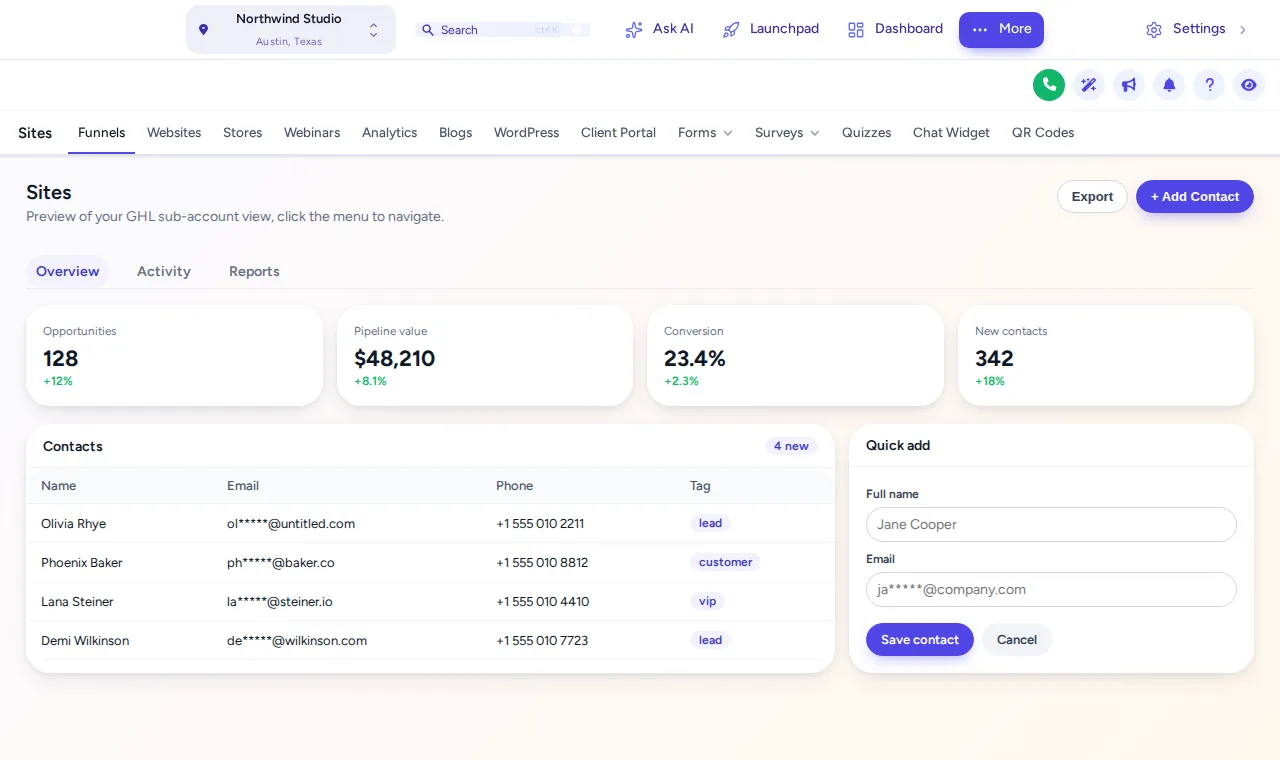
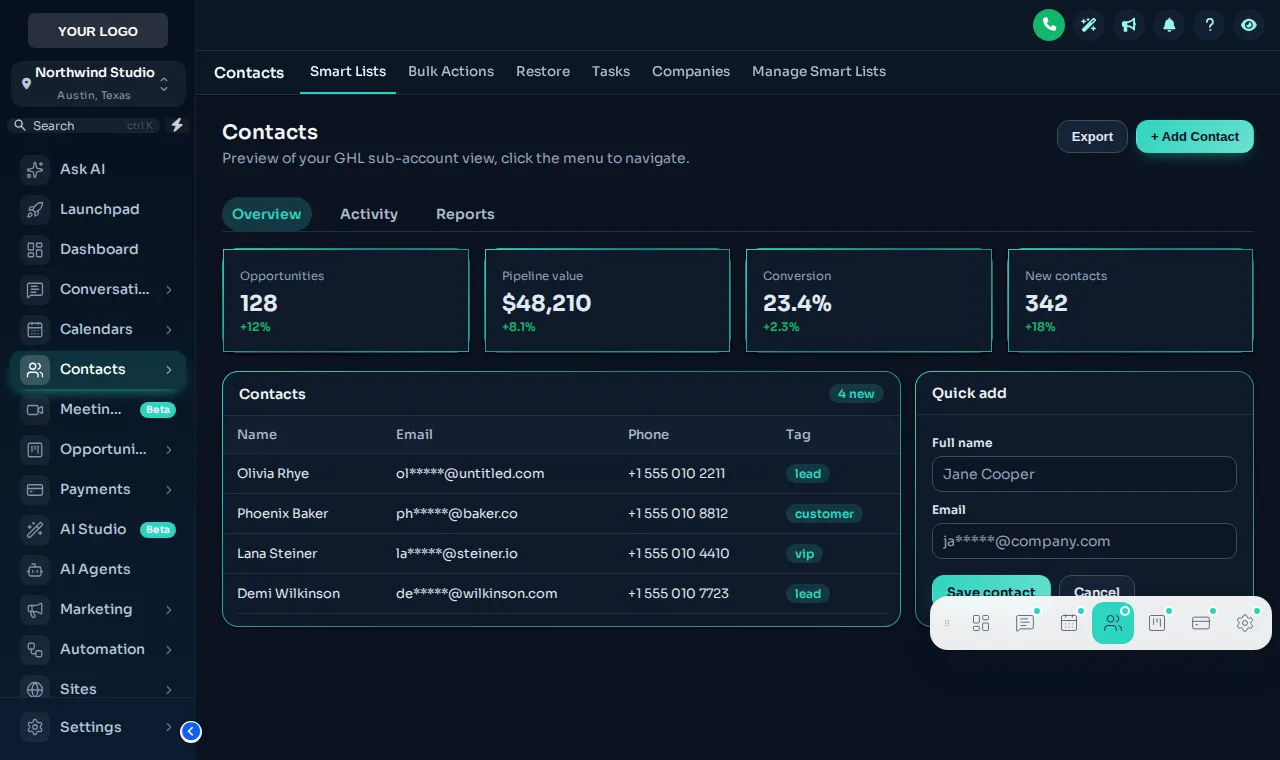
Captured from the preview
Top bar for the office, quick menu for the floor
A top bar gives dashboards and the dispatch board the full screen width. The floating quick menu keeps Calls, Schedule and Customers one tap away on every page, wherever the tech or CSR has wandered.
FAQ
Menu questions, sorted
Layouts, permissions and what happens when GoHighLevel changes.
Stuck on something not listed? Ask a real person and we answer within one business day.
MN-01What can the GoHighLevel menu builder change?
Where the menu lives (left sidebar, right dock or a top bar in 8 styles), what is in it (rename, reorder, hide and group items, add your own links), how sections with sub-pages open (a list or one of 8 mega menu styles) and whether a floating quick menu sits over every page.
MN-02Which package do I need for the menu builder?
Choosing a sidebar or top-bar layout is part of every package, starting with Comfort Basic. The full menu builder, with mega menus and the floating quick menu, comes with Climate Pro ($437) and Total Comfort.
MN-03Does hiding a menu item stop someone opening that page?
No. Hiding takes it out of the menu so people are not distracted by it. To restrict access, combine it with GoHighLevel’s own user permissions and roles.
MN-04Can the agency view and sub-accounts have different menus?
Yes. Each view has its own list of items and its own settings, so your agency staff see agency tools and a shop’s CSRs see the five things they use.
MN-05Where do sub-menus and mega menus get their pages from?
The customizer learns each section’s tabs and drop-downs from GoHighLevel itself as people use the app, so new GoHighLevel pages show up without you adding them by hand.
MN-06What happens when GoHighLevel adds a new menu item?
New items are appended to your menu automatically unless you switch that off, and clicks are handed to GoHighLevel’s own links, so navigation keeps working.
MN-07What is the floating quick menu?
A small launcher that floats over every page with the pages people use most: a bubble that opens a grid, a dock bar or a side rail, in 8 designs. Anyone can drag it out of the way and it remembers where they left it.
MN-08Can I add links to my own tools?
Yes. Add links to your price book, help center, booking page, training videos or anything else, opening inside the app or in a new tab.
MN-09What happens on GoHighLevel settings pages?
Settings keep a clear way back. In top bar mode the settings links sit in the top bar, and individual settings pages can be pinned to the floating menu.
Keep exploring
Connected zones
- Z-01Themes and dark mode27 complete themes (3 dark), 11 UI kits, your logo and colors, and the GoHighLevel blues remapped to your brand.Comfort Basic · $177+
- Z-04Dashboard designs18 dashboard designs (6 with photo backgrounds) for the GoHighLevel sub-account dashboard.Climate Pro · $437+
- Z-06Contact actions barA draggable bar on the contact record with quick tags and action buttons, in 6 positions.Climate Pro · $437+
- Z-05Pipeline designs12 opportunities board designs, including Brand Match, which builds stage colors from your primary color.Climate Pro · $437+
- SnapshotCRM and workflow automationsThe pipelines and workflows your new menu points at.
Only the menu items your CSR actually uses
Climate Pro adds the full menu builder, mega menus and the floating quick menu, plus the dashboard and pipeline designers.
- One-time payment, lifetime access
- Login emailed within minutes (max 24 hours)
- Secure card payment by Stripe