

Jobber is one of the few field tools that will tell you the price without a demo. The plans, the per-user cost, the card rate, it is all on the pricing page (Jobber pricing). For an owner burned by “let me build you a custom quote,” that honesty is worth something. The catch is the one every published price hides: the plan card is the start of the bill, not the whole of it.
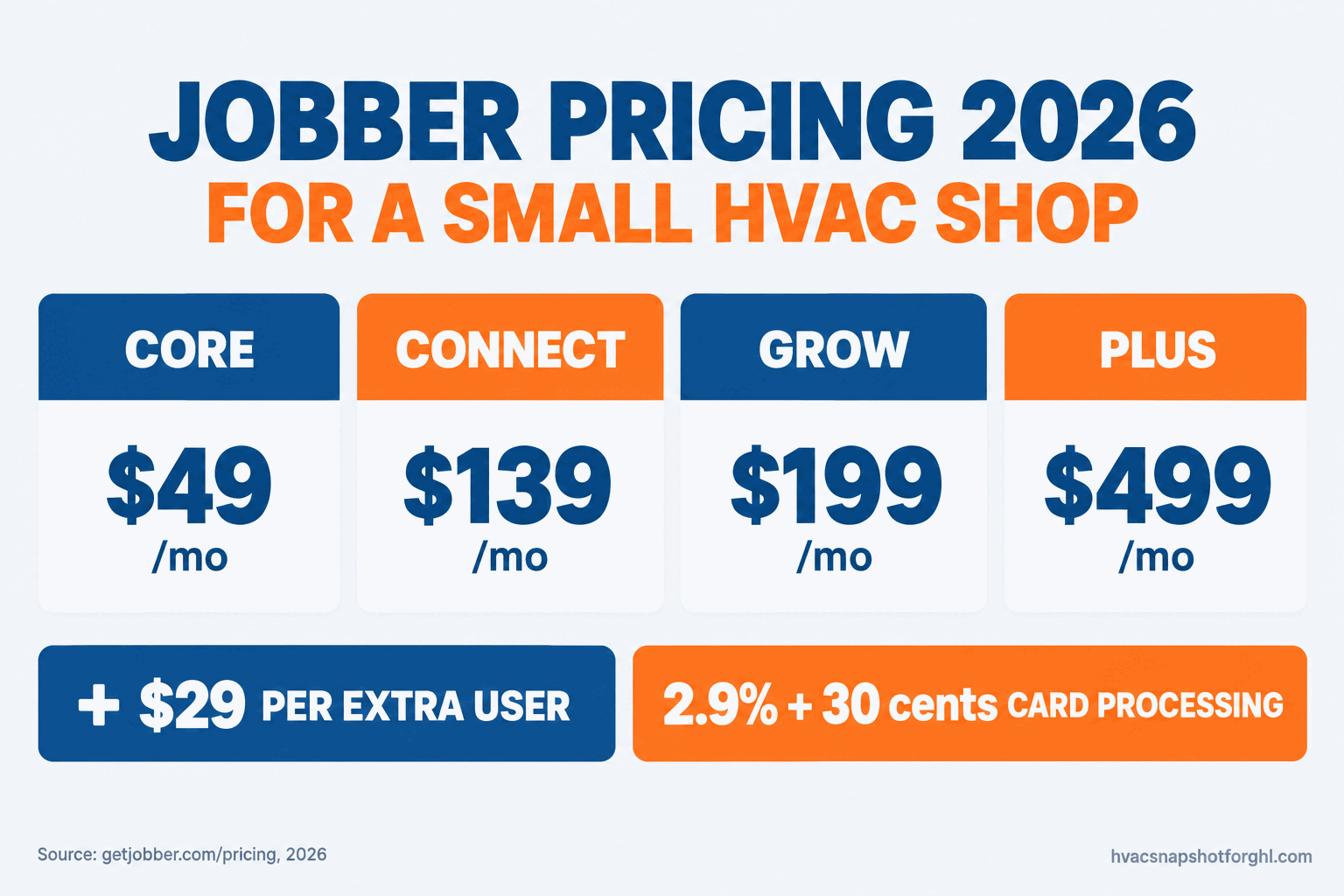
The short version: Jobber runs $49 a month for Core, $139 for Connect, $199 for Grow, and $499 for Plus, each covering a set number of users, with every extra login $29 a month on top (Jobber pricing). A five-truck shop that wants real automation lands around $3,400 to $5,500 a year in subscription, before card processing, the per-user creep, and the top-tier feature gate go to work on it. This teardown walks every one, and is honest about where Jobber, a tool built for fifty trades, falls short for HVAC.
On this page
- What Jobber actually is, and who it fits
- The real Jobber price, tier by tier
- The costs the plan card doesn’t show
- The per-user math: how the bill behaves as you add trucks
- Three scenarios: solo, 5 techs, 12 techs
- Jobber vs the rest of the field
- Where Jobber falls short for HVAC
- The questions to ask before you pick a tier
- The 10DLC bill every texting shop pays
- Objections and honest answers
- Frequently asked questions
What Jobber actually is, and who it fits
Jobber is a field service platform built for home-service businesses broadly: lawn care, cleaning, landscaping, pest control, plumbing, electrical, and HVAC all run on the same product. It is a generalist across trades, not a tool built around the way a cooling shop runs in July. It covers the core of any service business: scheduling and a dispatch board, quotes and invoices, a client database, online booking, payments, and automatic follow-ups. It is genuinely easy to use, which is why so many small shops start here (Jobber for HVAC).
So the question is not whether Jobber can run a small residential shop. It can. The questions are which tier you land on once you need the pieces HVAC leans on, what the per-user model does to your bill as you hire, and what the payments line costs on your revenue. That is where the published $49 turns into something larger.
The real Jobber price, tier by tier
Jobber shows three prices per plan: month-to-month with no commitment, a monthly rate on a one-year commitment, and prepaid annual. The numbers below are the no-commitment monthly rates. Annual is cheaper but locks you in.
Core, $49/mo ($29 annual), one user. Scheduling, quoting, invoicing, the client database, and payments (Jobber). The bare chassis: no automated follow-ups, no online booking depth, no real reporting. Fine for a one-person shop, thin for anyone trying to grow.
Connect, $139/mo for one user, rising with team size. The tier most small shops expect to land on. It adds payment reminders, online booking, QuickBooks sync, and the follow-up automations that make the tool earn its keep. Priced by seats: one user $139, five users $199, ten $299, fifteen $399 month-to-month (Jobber).
Grow, $199/mo for one user, the HVAC sweet spot. Adds quote follow-ups, two-way texting, job costing, and better reporting. Five users $299, ten $399, fifteen $499 month-to-month. Grow is usually the honest starting point for a real crew.
Plus, $499/mo from five users. The top tier, where Jobber parks its newest pieces: the AI Receptionist, Marketing Suite, Pipeline, crew scheduling, and dedicated onboarding (Jobber). Five users $499, ten $599, fifteen $699. If the AI and marketing tools sold you on Jobber, this is the tier you are really buying, not the $199 headline.
Across every plan, extra users past the included count are $29 a month each (Jobber). That is the number that quietly reshapes your bill.
The costs the plan card doesn’t show
The subscription is the part Jobber prints. These land after you sign, and for an HVAC shop the first is usually the biggest number on the bill.
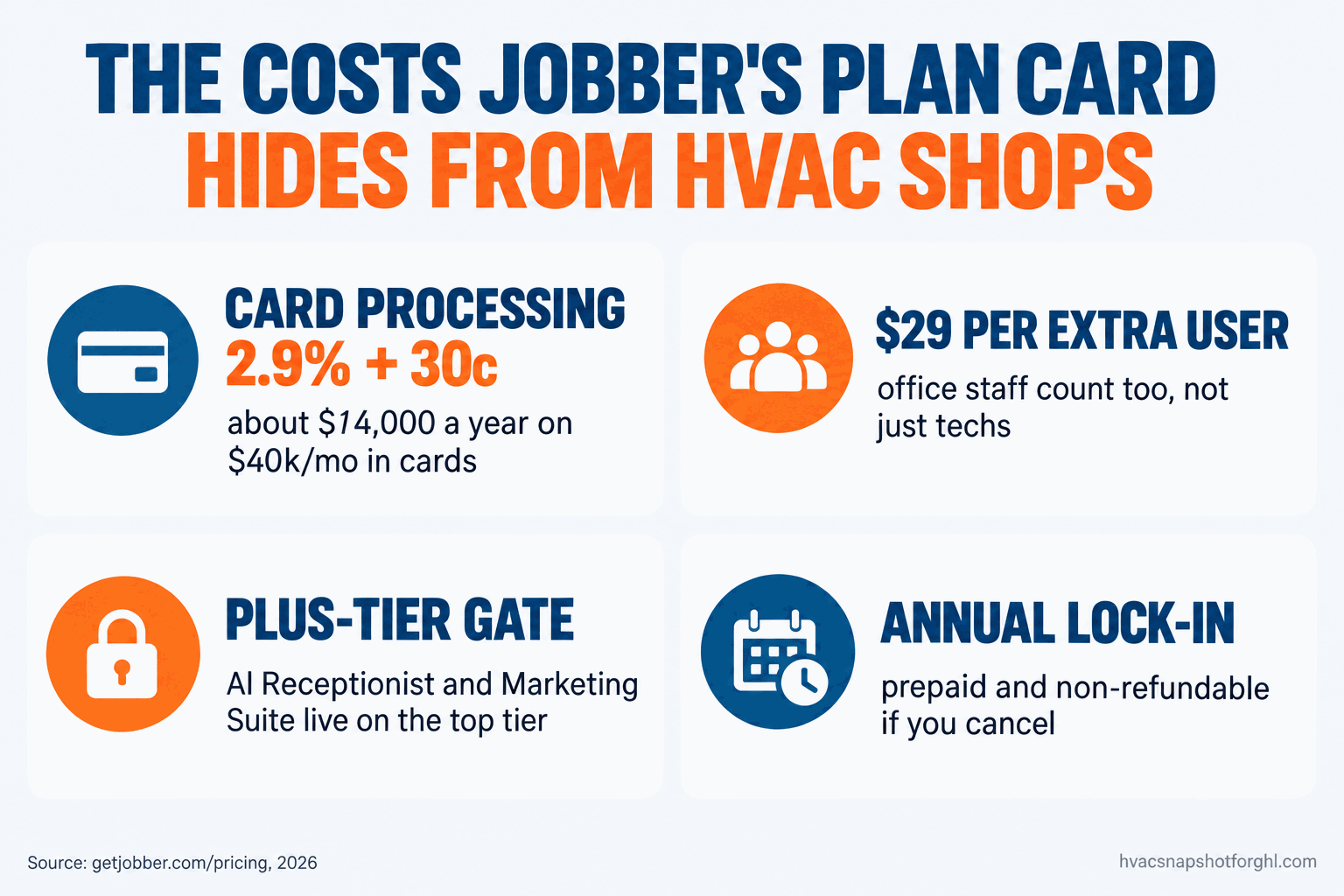
Card processing, the one that dwarfs everything. Jobber Payments charges 2.9% + 30¢ per card transaction, 2.7% + 30¢ for tap-to-pay, and 1% for bank (ACH) payments (Jobber). That 2.9% is on the high side of this market: a shop collecting $40,000 a month on cards pays roughly $14,000 a year, more than triple any tier, and above the “as low as 2.59%” Housecall Pro quotes (Housecall Pro). The number that moves your bill is the percentage on revenue, not the plan.
The per-user creep. Every tier includes a set number of seats; every login past that is $29 a month (Jobber). Five trucks is rarely five users. It is five techs plus a dispatcher and office manager, so seven or eight logins. On a five-user Grow plan, those extra three add about $1,044 a year. You price on truck count, then the office staff each need a seat.
The Plus tier gate. The pieces Jobber markets hardest, the AI Receptionist, Marketing Suite, and Pipeline, are Plus-tier features or paid add-ons ($29, $99, and $49/mo respectively) (Jobber). So “I’ll get Grow for $299” becomes Plus at $499 the moment you want the automation that caught your eye.
The annual lock-in. The cheaper annual rate is a prepaid, full-term commitment, non-refundable if you cancel (Jobber). Start month-to-month until your tier and user count are settled, then commit for the discount.
The per-user math: how the bill behaves as you add trucks
Unlike Service Fusion, which charges a flat rate for unlimited users, Jobber charges for every seat past the included count (Jobber). That is far cheaper than a per-technician tool like ServiceTitan, where contractors report $245 to $500 per tech per month (Projul, 2026), but it is not the flat bill a growing shop assumes. The chart below shows Grow climbing with headcount next to the flat line an unlimited-user tool draws. Jobber starts far cheaper for a small shop; the lines only cross once you are well into double-digit seats, where shops start asking whether per-user still makes sense (we walk that whole question in the per-tech versus unlimited-user breakdown).
Three scenarios: solo, 5 techs, 12 techs
Solo operator, one truck. Core at $49 a month ($588 a year) covers quoting, invoicing, and payments, but it is bare. Add automatic follow-ups and online booking and you are on Connect at $139 ($1,668 a year). Watch the card rate: at $15,000 a month, the 2.9% is about $5,200 a year, triple the Connect bill.
Five techs. Jobber’s sweet spot, and where the per-user model shows. You land on Grow, not at five users. Five techs plus a dispatcher and office manager is seven logins, so Grow at five users ($299/mo) plus two seats at $29 is about $357 a month, roughly $4,284 a year month-to-month, or closer to $3,400 annual. Want the AI Receptionist or marketing tools? Now you are pricing Plus, north of $6,000 a year. And card processing on a five-truck shop’s $30,000 to $60,000 a month runs $10,000 to $20,000 a year on its own. The five-tech decision is not the $299. It is the seats you forgot and the rate on your revenue.
Twelve techs. Twelve trucks plus three or four office people is fifteen-plus logins, pushing you to the top of the Grow or Plus seat tiers, $499 to $699 a month, roughly $6,000 to $8,400 a year (Jobber). Still a fraction of a per-technician tool, where ServiceTitan runs well into five figures plus a $5,000-and-up implementation fee (Projul, 2026). But this is the size where per-user and flat-unlimited get close enough to price both.
Jobber vs the rest of the field
Where Jobber sits against the tools a small shop usually weighs:
Jobber vs common small-shop HVAC software (2026)
| Platform | Published price? | Pricing model | Starting cost (reported / published) |
|---|---|---|---|
| Jobber | Yes | Tiered, per user | $49-$699/mo + $29/user + 2.9% card |
| Housecall Pro | Yes | Tiered, cheap extra seats | $59-$299/mo + 2.59% card |
| Service Fusion | Yes | Flat, unlimited users | ~$208-$533/mo |
| FieldEdge by Xplor | No, demo only | Per seat (office + tech) | ~$100 office / ~$125 tech per mo + setup |
| ServiceTitan | No, demo only | Per technician | ~$245-$500/tech/mo + $5K+ setup |
The honest read: Jobber and Housecall Pro are the two that just tell you the price, both near the bottom of the market on subscription. Jobber’s base tiers start cheaper, but its $29-per-user model and 2.9% card rate can make it the pricier of the two once you count seats and payments. Service Fusion counters with a flat, unlimited-user plan, around $208 to $533 a month (Capterra, 2026), which wins once headcount climbs. FieldEdge and ServiceTitan hide the number and charge per seat or per tech. For the full head-to-head, see the best ServiceTitan alternatives and the complete HVAC software pricing teardown.
Where Jobber falls short for HVAC
Price is only half the question. The other half is whether a tool built for fifty trades fits how an HVAC shop makes money. Here is where Jobber, in my experience running a service board, leaves gaps a cooling or heating shop feels.
Maintenance agreements are a workaround, not a feature. Jobber schedules recurring visits and can auto-charge a card on file, fine for the spring and fall tune-ups. What it does not do well is manage the agreement itself: tracking who is active, flagging renewals before they lapse, forecasting the membership revenue that carries you through February. One G2 reviewer flatly says the product is not optimized for HVAC companies running maintenance agreements without a workaround (G2 Jobber reviews). For a trade where the membership base is the off-season survival plan, that gap is not small.
It is a generalist, not a specialist. The same product runs a lawn-care crew and a plumbing shop. That breadth is why it is easy to learn, and also why it has no concept of what is specific to this trade: equipment and refrigerant history, how a changeout quote differs from a repair ticket, the shifting parts landscape as refrigerant rules change what you can sell. Even the AI Receptionist it now markets is a Plus-tier or $29 add-on front-desk assistant inside the app (Jobber), not a full 24/7 system that books every after-hours call. You can hold that in custom fields, but you build the structure yourself.
It manages the job, it does not win it. True of Jobber, Housecall Pro, FieldEdge, and ServiceTitan alike: they all take over after the customer is booked. None is sitting on your phone line at 7:40 on a July evening when your tech is on a rooftop and the office has gone home. That call, the dead condenser that rolls to voicemail and taps the next shop on Google, is where most small shops leak more than any pricing tier will cost them.
The questions to ask before you pick a tier
Jobber’s price is public, but your real total depends on answers the plan card does not give. Get these pinned down before you sign.
The 10DLC bill every texting shop pays
One cost shows up no matter which field tool you buy, because the carriers set it, not the vendor. Send business texts in the US, reminders, “tech is on the way,” review requests, and you are in A2P 10DLC territory, paying registration and per-message fees on top of your subscription.
The pieces are small but real: a one-time registration (around $24.50 for a sole proprietor or low-volume brand, roughly $71.91 for a standard high-volume setup), a per-campaign monthly fee of $2 to $10, and a per-message carrier surcharge near $0.003 per segment (Twilio 10DLC pricing). Same bill whether you text through Jobber, Housecall Pro, or a custom build. What bites is compliance: texting without proper consent and a clean opt-out is a TCPA exposure whose penalties dwarf those fees. We break it down, with the exact consent wording, in the HVAC TCPA and 10DLC guide.
Objections and honest answers
“Jobber is cheap, why are you making it complicated?” Because the $49 and $199 headlines are the cheap, honest part. The per-user seats, the 2.9% card rate, and the Plus-tier gate are where the real total forms, and the processing line alone usually beats the subscription several times over. The only way to know your number is to run your own seats and card volume, not the headline.
“I’ll just get Connect and save the money.” Maybe, if you only need scheduling and reminders. But two-way texting, quote follow-ups, and job costing are Grow features, and the AI and marketing tools are Plus or add-ons (Jobber). Most shops that start on Connect end up on Grow within a season, so price the tier you will actually use.
“Switching is a nightmare, I’d rather commit to annual for the discount.” Fair, which is why the data-export and cancellation questions matter before you sign. Start month-to-month until you are certain of your tier and user count, then switch to annual. Committing to a prepaid year before you know your tier is how you pay for the wrong plan for twelve months.
The bottom line
Jobber earns real credit for telling you the price. $49, $139, $199, $499, right on the page, card rate and per-user cost in plain sight (Jobber). For a small shop that wants a clean, easy tool without a demo gauntlet or an implementation project, it is a reasonable pick.
The catch is everything the plan card leaves out. Card processing at 2.9% is the biggest number on the bill, the per-user model creeps as you count the office staff you forgot, the AI and marketing tools sit at the top tier, and maintenance-agreement tracking is a manual workaround. Run your own seats and card volume, confirm which tier holds the features you came for, and start month-to-month until you are sure. And whichever tool you land on, remember it only manages the job after you win it. Spend your first automation dollar on the phone that wins it.
Jobber pricing, common questions
How much does Jobber cost in 2026?
Four tiers, month-to-month: Core $49/mo (1 user), Connect $139/mo, Grow $199/mo, and Plus $499/mo (from 5 users), each priced by team size with extra users $29/mo (Jobber pricing page). A 5-truck shop that wants real automation usually runs $3,400 to $5,500 a year before card processing.
What is Jobber's payment processing fee?
Jobber Payments charges 2.9% + 30¢ per card transaction, 2.7% + 30¢ for tap-to-pay, and 1% for bank (ACH) payments (Jobber pricing page). On $40,000 a month in card volume, that is roughly $14,000 a year, more than triple any subscription tier.
Is Jobber cheaper than Housecall Pro for an HVAC shop?
On base subscription Jobber starts a little lower, but its $29-per-user model and 2.9% card rate can make it pricier once you count seats and payments. Housecall Pro includes more users per tier and quotes card processing 'as low as 2.59%' (Housecall Pro pricing page). Run your own seats and card volume against both.
Does Jobber handle HVAC maintenance agreements?
Partly. It schedules recurring visits and can auto-charge a card on file, but it does not track agreement status, flag renewals, or forecast membership revenue without manual workarounds, and reviewers note it is not optimized for HVAC maintenance-agreement management (G2 Jobber reviews).
Will Jobber stop my missed calls?
No. Jobber works jobs you already booked, and its AI Receptionist is a Plus-tier or add-on front-desk assistant, not a full 24/7 system that answers and books every after-hours call. The biggest leak in most small shops is the unanswered call, which no field tool fully fixes. Our lead leak audit shows where those jobs go.
About the author
Tony Escalante is an HVAC Operations and Dispatch Strategist based in Phoenix, AZ. He spent a decade running the service board for a multi-truck residential cooling shop before moving into systems work. He writes about turning chaotic summer call volume into bookable, trackable jobs, and why the phone, not the wrench, is where most HVAC revenue leaks.
Related posts
- Housecall Pro Pricing in 2026: What a 5-Truck HVAC Shop Actually Pays
- ServiceTitan Pricing in 2026: What a 5-Truck HVAC Shop Actually Pays
- What HVAC Software Really Costs in 2026: A Small-Shop Pricing Teardown
- Per-Tech vs Unlimited-User Pricing: The Break-Even Truck Count
- The Best ServiceTitan Alternatives for a Small HVAC Shop (2026)