
It’s 9:20 on a humid August night in South Philly. The condenser on a Passyunk rowhome just quit, the second floor is still holding the day’s heat, and the homeowner does what almost everyone does now before dialing a phone: they pull up two or three HVAC shops on their phone and start poking at whichever website loads first. Your site loads. There’s a “Contact Us” form. They fill in half of it, hit a question they can’t answer — “do you even come out at night?” — and bounce to the next shop, whose site has a little chat bubble that answered in three seconds and offered them a 7 a.m. slot. That job is booked before your office opens.
Here’s the short version: an AI chat widget is a small conversational assistant that lives on your website, greets every visitor instantly, answers the “do you service my area / how much / how soon” questions, and books the service call straight onto your calendar — 24 hours a day, including the nights and weekends when your office is dark. For a Philadelphia HVAC shop working the oldest housing stock in Pennsylvania, that after-hours window is where a lot of real money is decided. This is the step-by-step playbook to set one up and actually capture those jobs.
On this page
- What is an AI chat widget for an HVAC website?
- Why Philadelphia HVAC shops leak jobs after 5 p.m.
- Speed-to-lead: the number that decides the job
- What one booked after-hours chat is actually worth
- The 7-step playbook to set up your AI chat widget
- Keep it compliant: TCPA & 10DLC
- Frequently asked questions
What is an AI chat widget for an HVAC website?
An AI chat widget is a conversational assistant embedded on your website — the little chat bubble in the corner — that engages every visitor automatically, answers the questions a homeowner actually asks before booking (“do you service Fishtown?”, “how much is a tune-up?”, “can someone come tonight?”), qualifies them, and drops a confirmed appointment onto your dispatch calendar. It runs 24/7, in your shop’s voice, without anyone at the office lifting a finger. It’s the website version of the front-desk person you wish you could clone for the night shift.
The difference between a chat widget and the “Contact Us” form most HVAC sites still run is the difference between a conversation and a suggestion box. A form collects a name and a note, then sits in an inbox until someone reads it — usually the next business morning. A conversational AI chatbot replies in the moment, handles the back-and-forth, and books the job while the homeowner is still standing in their hot living room deciding who to trust. One captures intent; the other captures the appointment.
Why Philadelphia HVAC shops leak jobs after 5 p.m.
Philadelphia is a hard market to serve with office hours alone, for two reasons.
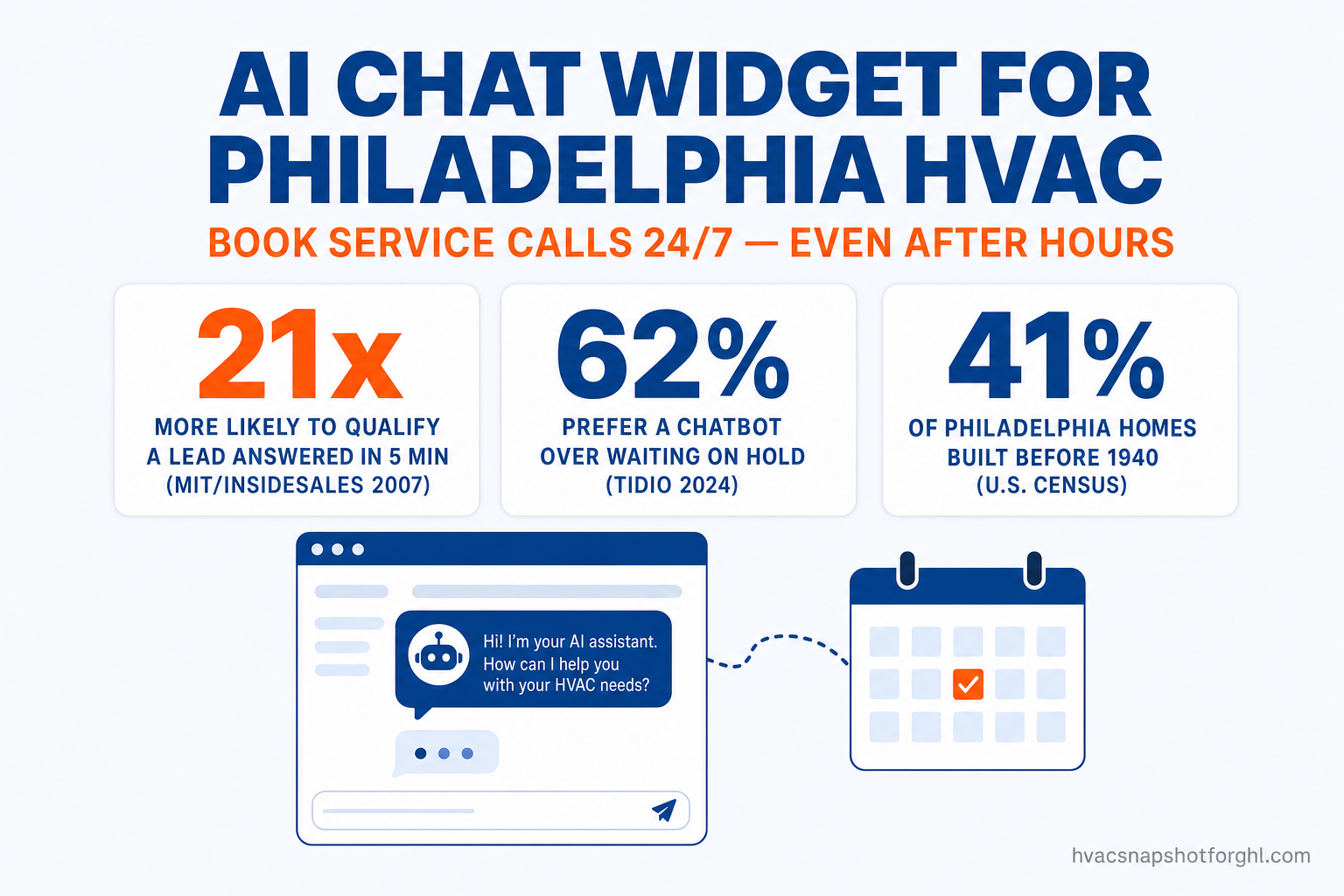
First, the housing. Philly has some of the oldest residential stock in the country — roughly 41% of homes were built before 1940, with a median year built around 1949 (Philadelphia Inquirer / Census, 2014). Old rowhomes mean aging and oversized equipment, retrofitted ductwork, converted heating systems, and homeowners who face a repair-or-replace decision far more often than a shop working new construction in the suburbs. Across roughly 702,000 households in the city, that’s a steady drumbeat of service demand — and a lot of it surfaces the moment a system fails, which is rarely between 9 and 5.
Second, the climate keeps both sides of the calendar busy. Philadelphia sits in a humid subtropical zone: July highs push into the upper 80s °F with sticky humidity, while January lows drop to the mid-20s °F (NWS Philadelphia/Mount Holly). That means peak cooling emergencies in summer and no-heat calls in winter — a two-season rush where the phones and the website get hammered exactly when nobody’s at the desk. A system doesn’t wait for business hours to fail, and neither does the homeowner’s search for who can fix it.
That’s the leak: the emergency happens at night, the homeowner researches on their phone, and the shop that answers in seconds wins the job. If your website goes silent after 5 p.m., you’re not “closed for the day” — you’re handing the night’s jobs to whoever isn’t.
Every HVAC shop I’ve onboarded already spends money to get homeowners onto their website. The chat widget just stops the ones who show up at 9 p.m. from leaving without booking. It’s the cheapest lead you’ll ever capture, because you already paid to get them there.
Speed-to-lead: the number that decides the job
The reason a chat widget pays for itself comes down to one of the most replicated findings in sales research. Dr. James Oldroyd’s landmark study (then at MIT Sloan, with InsideSales.com) analyzed more than 15,000 leads and 100,000 call attempts and found that a lead contacted within 5 minutes is 21 times more likely to qualify — to actually enter your pipeline — than one contacted at 30 minutes, and you’re 100 times more likely to even make contact (Lead Response Management / MIT, 2007). The window that decides the job is measured in minutes, and it slams shut fast.
Now hold that against how the average business actually performs. When Harvard Business Review audited 2,241 U.S. companies, it found the average firm took 42 hours to respond to a web lead, only 37% responded within an hour, and 23% never responded at all (HBR, “The Short Life of Online Sales Leads,” 2011). That’s the gap you get to exploit: homeowners expect an answer now, and almost nobody delivers one.
No human on your team can sit on the website 24/7 waiting to pounce inside five minutes — especially during a July heat spell when everyone’s on a truck. That’s exactly the job a chat widget was built for: it answers the instant a message lands, day or night, so you hit the window that converts on every single visitor. It’s the website twin of the speed-to-lead system every fast-growing shop is building, and the same instant-answer logic behind a good after-hours AI receptionist on the phone line.
What one booked after-hours chat is actually worth
Speed only matters because the tickets are big. This is HVAC, not a $20 impulse buy — every captured conversation is a real service call with real dollars attached.
In 2026, Angi pegs the average HVAC repair at about $350 (with a wide $100–$3,000 range), while a full system replacement averages roughly $7,500 and commonly runs $5,000–$12,500, and a large AC or full-system job with ductwork can climb past $20,000 (Angi, 2026). Set that against what you pay to generate a lead in the first place: HVAC cost-per-lead benchmarks land around $45 (LocaliQ) to ~$104 (SearchLight Digital) depending on channel and market (WebFX, 2026). You are spending real ad money to get homeowners to your site. Letting one bounce at 9 p.m. because nothing answered is the most expensive kind of waste — you paid for the click and then gave the job away.
Run the math on a single month. If your widget catches just two after-hours jobs you’d otherwise have lost — say one repair and one replacement — that’s roughly $7,850 in booked work from conversations that used to die in a silent inbox. The widget doesn’t need to be brilliant. It just needs to answer, every time, so the homeowner who already found you doesn’t leave to find someone else.
The 7-step playbook to set up your AI chat widget
Here’s the actual build. This is the sequence we run when we install the chat widget as part of an HVAC snapshot — you can follow it yourself in GoHighLevel, or have us do it done-for-you.
- Put the widget on every page, and load it fast. The chat bubble should appear site-wide — service pages, blog, contact page — not just the homepage. On a slow site the widget can load after the visitor has already bounced, so this pairs with a genuinely fast website; if yours drags, our Astro-built HVAC sites load the widget instantly.
- Write the greeting like a dispatcher, not a bot. Open with the question homeowners actually have: “Need service in the Philadelphia area? Tell me what’s going on and I’ll get you booked.” Skip “How can I help you today?” — lead with booking intent.
- Feed it your real service facts. Load the widget’s knowledge with your service area (neighborhoods and ZIP codes you cover), your hours and emergency policy, ballpark pricing ranges, brands you service, and financing options. This is what lets it answer “do you service Manayunk?” and “how much is a tune-up?” without guessing.
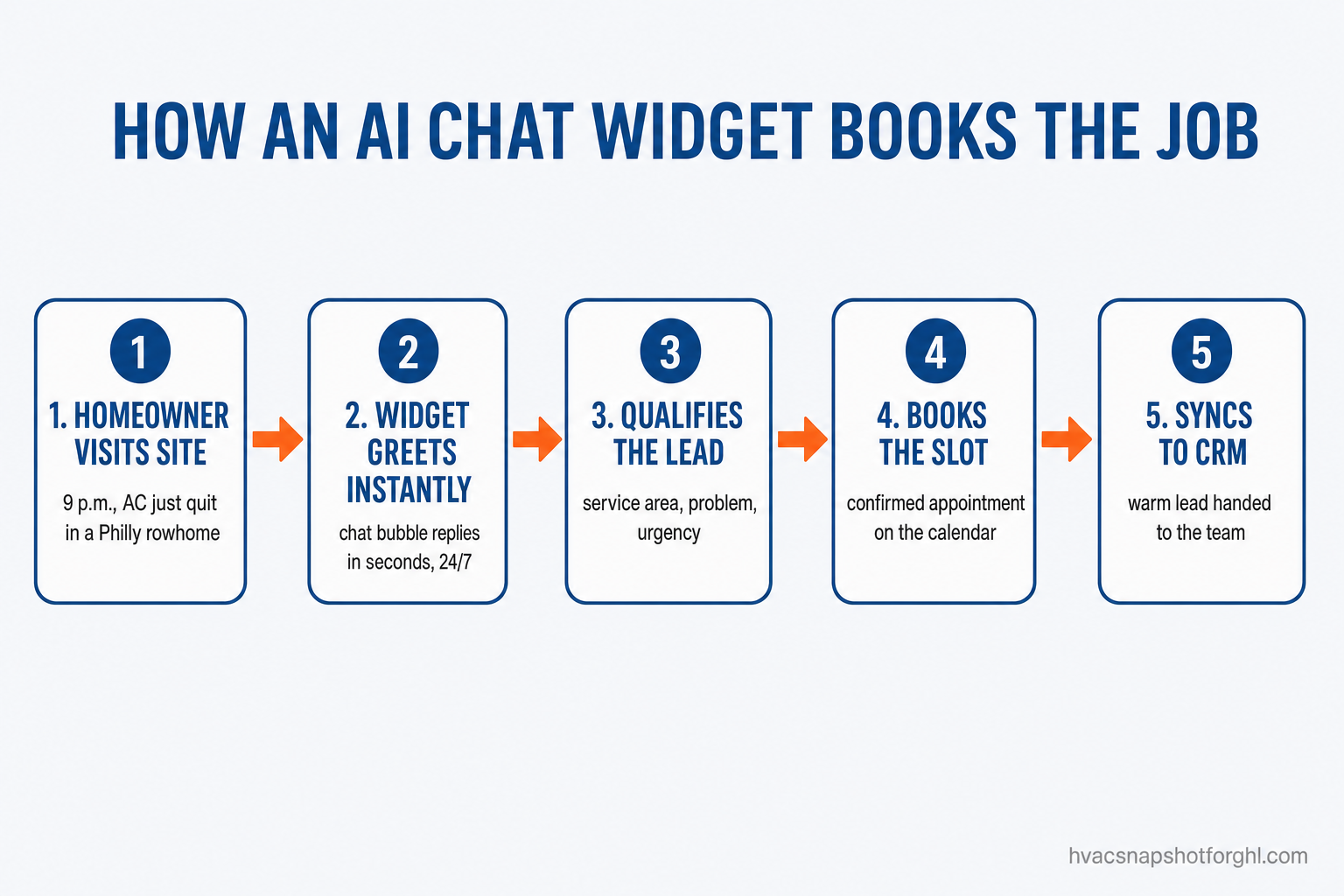
- Script the qualifying questions. The AI should capture the four things a dispatcher needs: name, address/service area, the problem (no cool / no heat / noise / install quote), and urgency (emergency vs. can-wait). This turns a vague “help” into a routable, bookable ticket.
- Wire it straight to your calendar. The payoff step: connect the widget to your booking calendar so it offers real open slots and confirms the appointment inside the chat. No “we’ll call you back,” no phone tag — the homeowner leaves with a time. This is the same online-booking flow that lifts appointment rates.
- Capture consent and hand off to SMS. Inside the conversation, capture the mobile number with clear opt-in language, then let the workflow send a confirmation text and reminders. Every lead and the full transcript sync to your CRM, tagged by source, so your team picks up a warm, qualified job.
- Set the escalation rule. Define exactly when the bot pulls in a human — a genuine emergency, a commercial job, an angry customer — and route those to your on-call tech or office line immediately. Automation handles the routine 80%; your people handle the 20% that needs judgment.
A Philadelphia HVAC site's after-hours traffic, before and after a chat widget
A homeowner lands at 9 p.m. with a dead AC, half-fills a Contact form, hits a question it can't answer, and bounces to the next shop. The form sits unread until 8 a.m. — by then the job is booked elsewhere. You paid for the click and never knew the visit happened.
The widget greets them in seconds, confirms you service their ZIP, captures the problem and urgency, and offers a 7 a.m. slot they accept on the spot. The confirmed appointment lands on your calendar overnight, a reminder text goes out, and your team opens the day with a warm, booked job.
Keep it compliant: TCPA & 10DLC
The moment your chat widget moves a homeowner into text follow-up — confirmations, reminders, “your tech is on the way” — you’re in TCPA and 10DLC territory. That means capturing clear consent inside the conversation, honoring opt-outs (“reply STOP”), and running your business texting through a registered 10DLC campaign. A sloppy DIY setup that fires texts without consent isn’t a growth hack; it’s regulatory exposure.
A done-for-you build captures consent as part of the qualifying flow, keeps the audit trail, and only texts homeowners who opted in — handled by the workflow, not left to memory. We break down the rules in the HVAC TCPA & 10DLC guide, and it’s wired into how we configure the widget and the AI chatbot across your channels from day one. Done right, you get the speed of automation without the risk.
The bottom line for a Philadelphia shop
You already do the hard part — you run trucks, you fix systems, you spend money to get homeowners onto your website. An AI chat widget just makes sure the ones who show up at 9 p.m. in a hot rowhome don’t leave without booking. In a city where 40-plus percent of homes are pushing a century old and the phone rings in both July and January, the shop that answers the website first — every time, at every hour — is the shop that books the job. Everyone else finds out the next morning that they were in the running and lost it to a three-second reply.
Frequently asked questions
AI chat widgets for HVAC websites — common questions
What is an AI chat widget for an HVAC website?
It's a conversational assistant embedded on your site — the chat bubble in the corner — that greets every visitor instantly, answers the questions homeowners ask before booking ('do you service my area?', 'how much is a tune-up?', 'can someone come tonight?'), qualifies them, and books a service call straight onto your calendar. It runs 24/7 in your shop's voice, so after-hours visitors get answered instead of bouncing to a competitor.
Why does an HVAC shop in Philadelphia specifically need one?
Philadelphia has some of the oldest housing stock in the country — roughly 41% of homes were built before 1940 (Census / Inquirer) — which means constant repair-or-replace demand across ~702,000 households, plus hot humid summers and cold winters that drive both AC and heating emergencies. A lot of that demand surfaces at night and on weekends when your office is closed, so a widget that answers around the clock captures jobs office hours can't.
How is a chat widget different from the contact form I already have?
A form collects a name and a note, then waits in an inbox — the average business takes 42 hours to respond and 23% never respond at all (HBR, 2011). A chat widget has a real-time conversation, answers the homeowner's questions on the spot, and books the appointment while they're still on your site. One captures intent; the other captures the booked job.
Will it sound robotic and hurt my brand?
Good setup is configured in your shop's voice and handles the routine, repetitive questions — service area, pricing ranges, availability — instantly, then escalates genuinely complex or emergency conversations to your team. Homeowners overwhelmingly prefer a fast, helpful answer to waiting: 62% would rather use a chatbot than wait for a human, and 64% say 24/7 availability is its best feature (Tidio, 2024).
Is automated chat-to-text follow-up TCPA compliant?
It can and must be. Once the conversation moves a homeowner into SMS, you need TCPA-compliant consent, opt-out handling, and a registered 10DLC campaign. A done-for-you build captures consent inside the chat and only texts homeowners who opted in. See our HVAC TCPA & 10DLC guide for the details.
How fast can I get one live, and does it only work in Philadelphia?
As part of our done-for-you HVAC snapshot, the chat widget is typically configured and live in about 24 hours. And no — Philadelphia is just a clear example of an old-housing, two-season market where answering first is the whole edge. The same widget works for any residential or light-commercial HVAC contractor in the U.S. or Canada. Book a free walkthrough to see it on your site.
About the author
Rachel Okonkwo is a GoHighLevel Automation Consultant based in Columbus, OH. She builds GoHighLevel workflows for home-service contractors and the agencies that white-label for them — wiring up AI receptionists, chat widgets, review engines, and maintenance-plan renewals across dozens of HVAC accounts. She writes the implementation-heavy pieces: pipelines, tags, triggers, and the snapshot install itself, with a bias toward the automations that pay back inside 30 days.
Related posts
- HVAC AI Chatbot: How to Turn Website & Social Visitors Into Booked Jobs
- Speed to Lead for HVAC: Why the First 5 Minutes Decide Who Wins the Job
- HVAC Online Booking: The Self-Scheduling System That Fills Your Calendar
- The After-Hours Call Leak Costing Charlotte HVAC Shops Thousands
- Is Your HVAC AI Receptionist TCPA-Compliant? The 2026 Rules